Small Health HabitsMy Midlife Story guide

Updated November 2026 · by Honest Little Apps

Foggy at Work? Clear Notes in 7 Days.

For women in perimenopause. Tap each foggy moment today; we count and word your doctor note.

0 foggy moments today
Download on the App Store Free on iPhoneGet My Midlife Story free
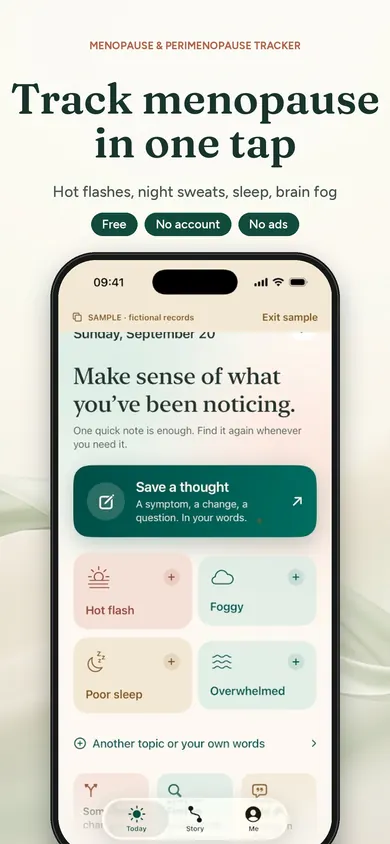
My Midlife Story home screen with one-tap buttons for Hot flash, Foggy, Poor sleep and Overwhelmed

Is perimenopause brain fog at work real?

Yes. The NHS lists problems with memory or concentration among the symptoms of menopause and perimenopause, and a large US study found that verbal memory and processing speed stopped improving with practice during perimenopause, then picked back up after menopause. It's common, it's usually temporary, and it's worth writing down.

The NHS symptoms page (reviewed May 2026) puts "poor memory and brain fog" alongside mood changes, and says symptoms usually last 7 to 9 years, sometimes longer, changing along the way. The study is SWAN, the Study of Women's Health Across the Nation: 2,362 women aged 42 to 52 were tested over four years, and as reported from the 2009 paper in Neurology, the memory difficulties seen in perimenopause disappeared by postmenopause.

At work, that tends to look like a word that won't come in a meeting, an email read three times, or walking into the supply room and forgetting why. Memory changes can have other causes too, from poor sleep to other health conditions. That's exactly why a clinician wants specifics, not "I've been a bit foggy."

Brain fog is hard to describe on the day. It's easy to describe from a week of notes.

Your first week of tracking brain fog, one day at a time

You don't need a diary habit. You need about 30 seconds a day and a place to put it.

  1. Name your moments

    Pick the three or four kinds of foggy moments you actually have at work. The counter above starts you with five common ones. Start tapping.

  2. Add the when

    Note the time of the worst moment. Morning-after-bad-sleep fog and 3 p.m. fog are different stories for a clinician.

  3. Add sleep

    One line: how you slept. Night sweats and waking around 3 a.m. often travel with daytime fog.

  4. Notice the cost

    Write one real-world effect: "Asked a colleague to repeat the plan twice." Specifics are what make a note useful.

  5. Mark anything that changed

    New medication, a stressful deadline, a period after months without one. Context keeps the picture honest.

  6. Write your questions

    Up to three. "Could this be perimenopause?" "What else should we rule out?" "What are my options at work?"

  7. Make the one-page note

    Turn the week into a short summary you can hand over. The note at the bottom of this page builds itself from your counter.

Seven short entries beat one long, tired explanation in a ten-minute appointment.

What tracking looks like in My Midlife Story

Real App Store screenshots. The records shown are the app's fictional samples.

One-tap buttons including Foggy and Poor sleep
"Foggy" is one tap, saved with its date and time.
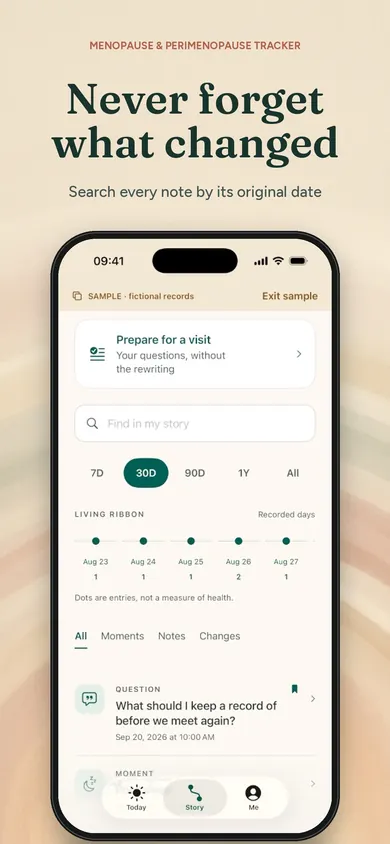
Story view with 7D, 30D, 90D and 1Y filters and a search box
Filter by 7, 30 or 90 days, or search every note by its date.
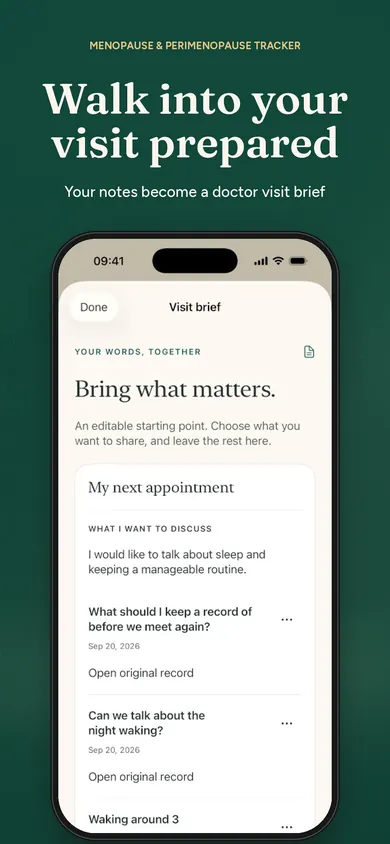
Editable visit brief listing what to discuss and saved questions
An editable visit brief, with each line linked to the original note.

Ways to track brain fog before a doctor appointment

Each works. Pick the one you'll actually keep for a week. One row is our app, so read it with that in mind.

MethodGood atWatch out for
Paper notebookFree, private, no screenHard to search; easy to leave at home on appointment day
Phone notes appAlways with youBecomes one long scroll; no dates per entry unless you type them
Calendar entriesDates built inClutters your work calendar; colleagues may see titles
My Midlife Story (ours)One-tap notes with date and time, 7/30/90-day filters, a one-page visit brief and PDF; no accountTakes a few minutes to set up; it organizes notes and doesn't interpret them

Honest limits

  • It won't diagnose anything. My Midlife Story organizes your own notes and questions. It doesn't diagnose, recommend treatment or doses, or say one thing caused another.
  • A count isn't a test. Tapping "Foggy" five times shows a pattern in your words. It isn't a memory score.
  • Missing days stay unknown. A day you didn't log isn't a good day; the app doesn't pretend otherwise.

Who should pick something else: if your memory problems are sudden, getting quickly worse, or come with confusion, trouble speaking, weakness or a severe headache, don't wait a week to track. Seek urgent medical help. And if you already keep a paper log that works, keep it.

For context on how diagnosis usually works: the NICE menopause guideline (NG23) says perimenopause can be diagnosed without lab tests in otherwise healthy women over 45, based on hot flushes and irregular periods. Symptom notes are part of that conversation.

Your notes can't diagnose you. They can make sure you're heard.

A Thursday, told plainly

This is a composite day, not a real person. A team lead in her late forties loses the name of a project she's run for a year, mid-sentence, in front of eight people. By lunch she's reread the same contract clause four times. At 3 p.m. she walks to the printer and stands there.

In past years that day would have become "I've just been foggy" at an appointment two months later. This time it's three taps, a line about waking at 3 a.m., and one question saved for her next visit: "Could this be perimenopause, and what else should we check?"

Three taps on Thursday become one clear sentence at the appointment.

Your one-page brain fog note

This builds from the counter at the top of the page. Tap through the day, then print or copy it. Nothing is saved or sent anywhere.

For my next appointment

How it works in the app, in three steps

  1. 1

    Tap when it happens

    Foggy, Poor sleep, Overwhelmed: one tap saves the moment. Add your own words when you want to.

  2. 2

    Look back by week

    Filter by 7 or 30 days. Use "Something changed" when a symptom shifts; later notes never overwrite earlier ones.

  3. 3

    Bring a visit brief

    Pick your main concern and up to three questions, preview and edit a one-page brief, and save it as a PDF to print or share only when you decide.

Our design decision: there are no streaks to lose. A break never removes progress, and the story garden's points never depend on symptoms or how you feel. No account, no ads, and your records stay on your device. This is general information, not medical advice. Talk to your clinician.

A week of notes. One clear visit.

One-tap logging, history, search, visit briefs and PDF export are free.

Download on the App Store Free on iPhoneGet My Midlife Story free

More from Small Health Habits