Which menopause tracker apps make a doctor report for free?
Of the four iPhone menopause trackers we checked on November 3, 2026, two put a doctor report in the free tier: Balance (a "Health Report") and My Midlife Story (an editable visit brief and PDF). Menelle and MidLife both list their PDF reports as paid features. All four are free to download.
We make My Midlife Story, so read this as a comparison written by one of the four. We built it from the apps' own App Store descriptions, and where a listing doesn't say something, the table says so instead of guessing. Features and prices change; check each listing before you pay for anything.
Why a report at all? Mayo Clinic's menopause appointment guidance (checked November 2026) suggests you "keep track of your symptoms", for instance counting hot flashes in a day or week and noting how bad they are, and that you write down your most important questions first. The NHS symptoms page notes that symptoms usually last 7 to 9 years and can change along the way, which is exactly why memory alone struggles.
A good tracker is the one that turns scattered moments into a page your clinician can read in a minute.
Honest limits of My Midlife Story
Here is what our app does not do, so you can rule it out quickly.
- No articles, community or live sessions. Balance lists a large library of expert articles and a community in its free tier. We have neither.
- No cycle-variability analysis. You can record periods, but MidLife lists dedicated irregular-cycle analysis that we don't offer.
- No trigger or food insights. By design, My Midlife Story never says one thing caused another. Menelle lists meal scanning for possible triggers in its Pro tier.
- Premium is a subscription. Optional Premium is monthly or annual. MidLife's paid tier is a one-time purchase, which some people strongly prefer.
- It doesn't diagnose. No tracker should. It organizes your notes and questions; your clinician does the rest.
If you want a library to read, Balance is built for that. If you want a page to hand over, that's our lane.
Menopause doctor report questions, answered
Is there a free menopause tracker that makes a doctor report?
What should a menopause doctor report include?
How long should I track symptoms before my appointment?
Do I have to log every day?
Can a symptom tracker app tell me I'm in perimenopause?
Does My Midlife Story work on iPad and need an account?
Menopause symptom tracker apps compared: the strip
Checked against each App Store listing on November 3, 2026. "Not stated" means the listing doesn't say.
| App | Doctor report free? | Paid tier |
|---|---|---|
| My Midlife Story (ours) | Yes: visit brief + PDF | Optional subscription |
| Balance | Yes: Health Report | Optional balance+ subscription |
| Menelle | No: PDF reports in Pro | Menelle Pro |
| MidLife | No: PDF reports in Pro | One-time purchase |
My Midlife Story
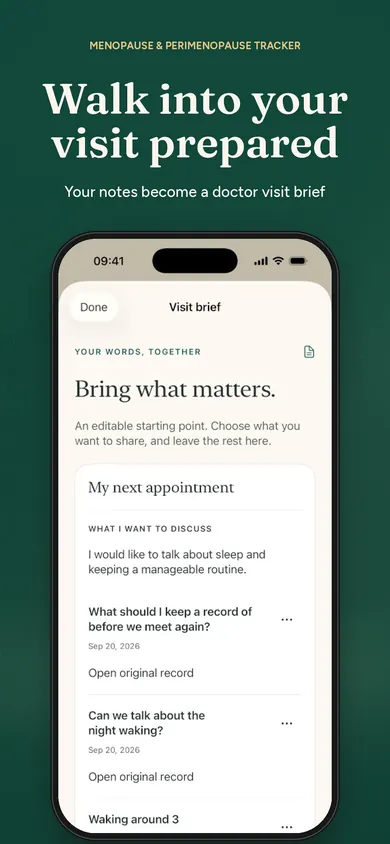
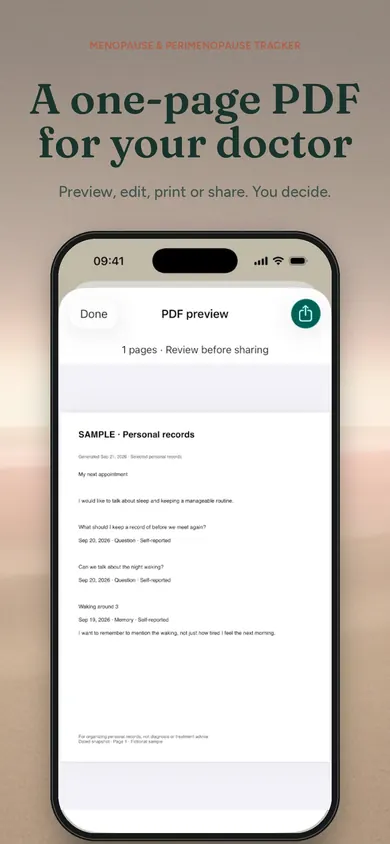
One-tap logging, an editable one-page visit brief you preview before saving as a PDF, and every line linked back to the original note. No account, records stay on device. Premium adds period comparisons, grouped Replays and advanced briefs.
Balance
Founded by a menopause doctor. Free tier lists expert articles, symptom and period tracking, a Health Report, community and sleep monitoring. balance+ adds live sessions, expert content and exercise classes. The listing doesn't state whether an account is required.
Menelle
Free daily tracking of symptoms, medications, supplements, periods and your own custom trackers, plus 7-day insights. Pro adds meal scanning, longer trends and doctor-ready PDF reports. Lists secure local storage.
MidLife
No account, no cloud, no subscription. Free tracks up to 7 symptoms with 30 days of history and cycle tracking. The one-time Pro purchase adds unlimited symptoms, medication reminders, PDF reports and CSV/JSON export.
Two of four give you the report for free. Only you know which other features are worth paying for.
How a visit brief works in My Midlife Story
Tap when it happens
Hot flash, foggy, poor sleep, overwhelmed: one tap saves the moment with its date and time. Add your own words when you want to.
Keep every question
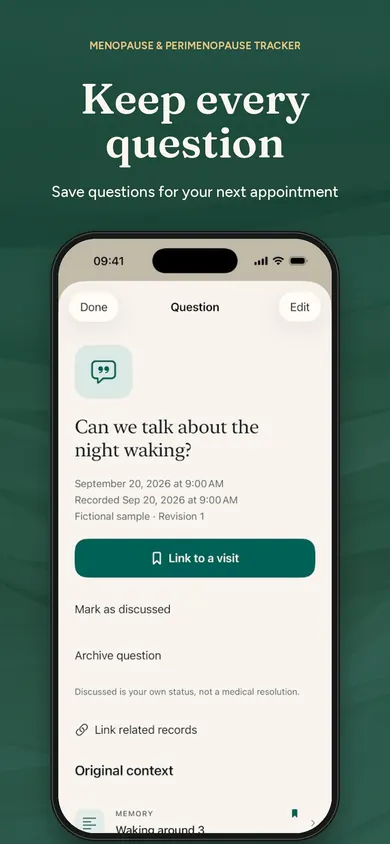
Save questions as they come up. Use "Something changed" when a symptom shifts or a treatment your clinician prescribed changes; later notes never overwrite earlier ones.
Build the one page
Pick your main concern, up to three questions and the notes to share. Preview and edit the brief, then save it as a PDF, print it, or share it only when you decide.
Our design decision: the brief is a starting point you edit, not a verdict. The app does not diagnose, recommend treatment or doses, or say one thing caused another. This is general information, not medical advice. Talk to your clinician.
Who should pick something else
- You want to learn about menopause from articles and experts, or talk with others going through it: try Balance.
- You want to pay once, never a subscription, and need detailed cycle analysis: MidLife fits.
- You want to build your own trackers or scan meals: Menelle is closer.
- You'd rather keep paper: a notebook with dates, how often, how bad, and three questions does the same core job.
The right app is the one you'll still open the week before your appointment.
What it looks like
Real App Store screenshots. The records shown are the app's fictional samples.