Can you track water intake on Apple Watch?
Yes, but not with an app Apple puts on the watch. You can add water by hand in the iPhone Health app, run a Shortcut from the watch, or use a water app with its own watch app. The fastest of the three is the one that makes your bottle a single button on your wrist.
Apple Health is the place water ends up: it has a Water category under Nutrition, and other apps can write to it. What's missing is a quick way to put it there from your wrist, which is where people actually are when they finish a glass. That's the gap this page is about.
Water gets logged where your hand already is, or not at all.
How it works: wrist to Health in 3 steps
Pin your real bottle on iPhone
Save the bottle, glass or mug you use with its actual capacity, in ounces or mL, and pin it. That pinned bottle becomes the big button on the watch.
Tap it on your wrist
Dropkin's Apple Watch app shows today's progress, the pinned bottle as the big button, quick amounts, and the Digital Crown for any custom amount.
It syncs, counted once
Drinks sync to your iPhone and are counted once. If you turn on the optional Apple Health sync, Dropkin writes dietary water and updates or removes its own entries when you edit or delete a drink.
Three ways to log water on Apple Watch
We set up all three. Here's what each takes per drink, as of November 2026.
Health app, by hand iPhone only
- Steps
- Health › Water › Add Data › type amount › Add
- Good
- Free, built in, nothing to install
- Catch
- Not on the watch, and you type the amount every time
A Shortcut watch + iPhone
- Steps
- Build a "Log Health Sample" shortcut for Water once, then run it from the watch
- Good
- Free, flexible, lives on your wrist
- Catch
- Setup takes a few minutes; no running total or reminders
Dropkin's watch app ours, disclosed
- Steps
- Open the app, tap the pinned bottle
- Good
- Progress, quick amounts and Digital Crown custom amounts; reminders only during your hours
- Catch
- Another app to install; Pro extras cost money (the tracker itself is free)
Apple's own Shortcuts User Guide covers building and running shortcuts, including on Apple Watch.
How many taps a week? A quick count
Small friction adds up. Set how many drinks you log a day and see the weekly tap count for each route.
Our count: Health by hand is 5 steps per drink plus unlocking your phone. A Shortcut is about 2 taps (open, run) plus 2 for an odd amount. Dropkin is 1 tap for the pinned bottle, about 3 for a crown amount. Your watch face and complications can change these.
The route with the fewest taps is the one you'll still use in March.
Honest limits
- It's not automatic. No watch can tell what you drank. Every route still needs a tap.
- The watch app works alongside the iPhone app. You set up your bottles on iPhone first.
- Your goal is yours to choose. Mayo Clinic's 2026 water guide puts the average healthy adult at about 2.7 to 3.7 liters of total fluid a day, about 20% from food. Dropkin is not a medical device and doesn't decide your needs.
- Pick something else if you track food and water together (a nutrition app will suit you better), you're on a fluid limit set by your care team, or you already have a Shortcut you like.
This is general information, not medical advice. Talk to your clinician.
Questions about logging water on Apple Watch
Does Apple Watch have a built-in water tracker?
How do I add water to the Health app manually?
Will water logged on my watch show up in Apple Health?
Can I log a half bottle or an odd amount from the watch?
Is Dropkin free on Apple Watch?
What the free version gives you
The real screens, not mockups. Save the bottle once on iPhone; the watch uses it as its big button.
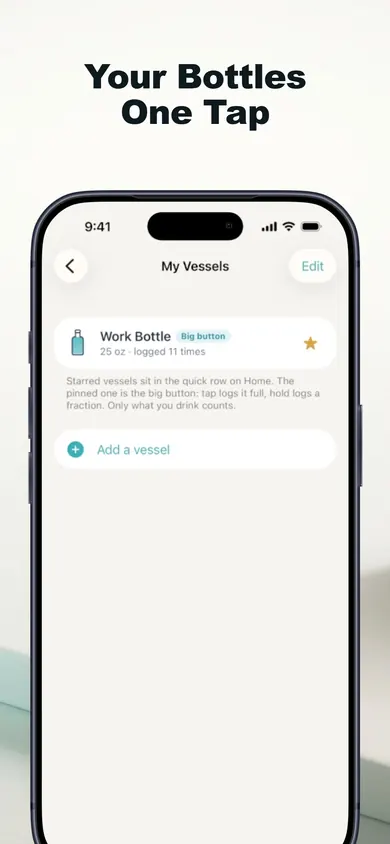
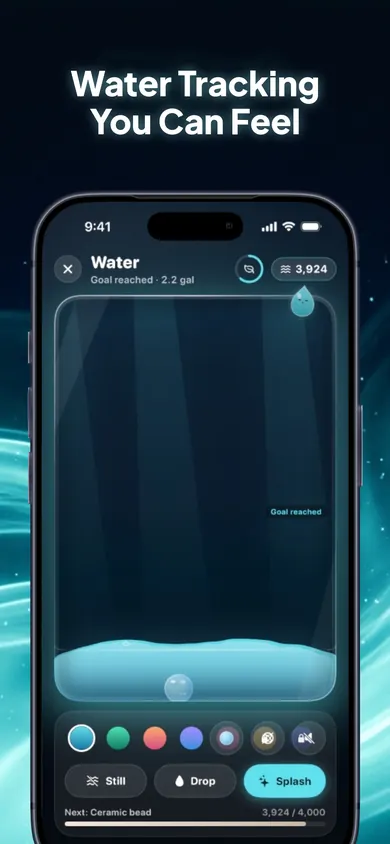
A morning, on the wrist
It's 9:40, you've just finished your bottle at your desk, and your phone is in your bag. A raise of the wrist, one tap, and it's logged. At 11:10 you only drank half; you turn the crown to 10 oz instead. By lunch your iPhone shows the same total, counted once, and the reminder that would have nudged you at noon stays quiet because you're on pace.
Our design decision: reminders get quieter, never louder, if you ignore them, and they stop once you reach your goal. Extra water past your goal earns nothing, so there's never a reason to overdo it.
Your bottle, one tap from your wrist.
Pin it on iPhone, tap it on your watch, and let the total take care of itself.
Sources: Mayo Clinic, Water: How much should you drink every day? (Jan 2026) · Apple Shortcuts User Guide
More from Small Health Habits
- Drinking water on a 12-hour shift with no breaksA shift water planner for nurses and 12-hour workers: tie your water to the breaks you actually get, plus a 7a–7p timeline that works.
- How to remember to drink water: a pairing checklistKeep forgetting to drink water? A 10-point pairing checklist for busy parents, a cue card you can print, and what Mayo Clinic and the NHS actually say.
- When will my prescription run out? A refill calculatorEnter pills on hand and pills per day to see the date each prescription runs out, a call-the-pharmacy date, and a timeline for up to five medicines.
- Nutrition apps without calorie counting, comparedWant to learn what food does instead of counting it? An honest November 2026 comparison of four iPhone nutrition apps, ours included.